Change Orders in Oceanside Kitchen Remodels: How to Control Scope, Protect Your Budget, and Keep the Timeline Calm (2026)
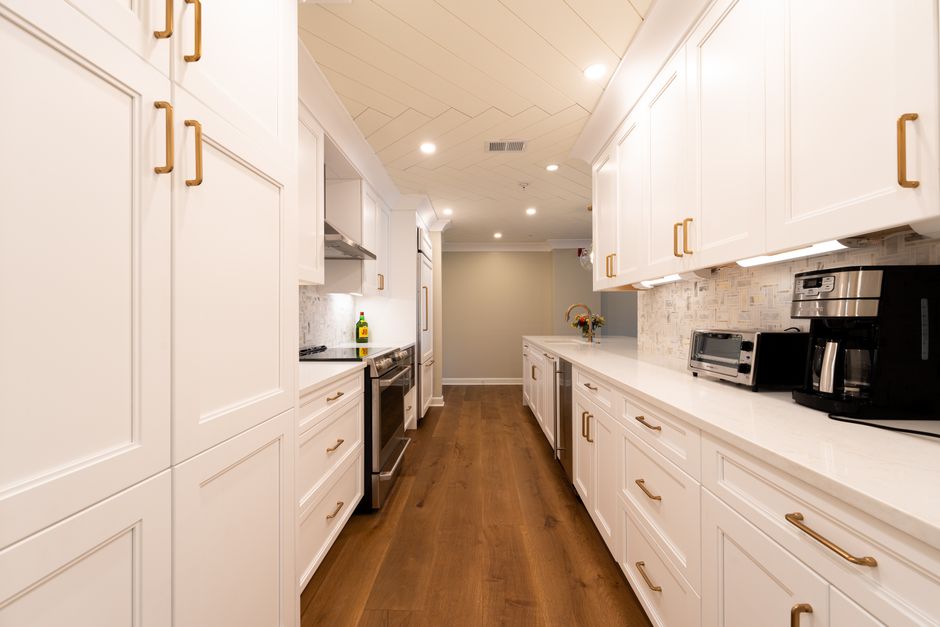
!Bright kitchen with simple lines and clear circulation
If you’ve heard remodeling horror stories, you’ve heard the phrase “change orders.” Sometimes people treat change orders like proof of a shady contractor. In reality, change orders are normal in remodeling—but only when they’re handled with a clear process.
This guide explains:
- when change orders are reasonable
- when they’re a warning sign
- how to structure your project so scope stays stable
If you’re reviewing proposals and want to reduce change-order risk, Call or text (858) 434-7166 for a fast, detailed estimate.
Table of Contents
- What a change order actually is
- The three categories of change orders
- Why change orders blow up budgets
- How to reduce change orders before construction starts
- How to run change orders safely during construction
- A homeowner decision calendar that works
- Red flags: when change orders are a pattern
- How to get an estimate
- Who we are
- What happens next
- Trust, licensing, and jobsite standards
For allowances and bid comparison, see: Learn More For common homeowner mistakes, see: Learn More
---
What a change order actually is
A change order is a written modification to your contract that changes:
- scope (what is being done)
- price (how much it costs) and/or
- time (how long it will take)
A safe change order is:
- written
- priced
- timed
- approved before work happens
A risky change order is:
- verbal
- vague
- “we’ll settle up later”
---
The three categories of change orders
Understanding why a change order exists helps you judge whether it’s reasonable.
1) Homeowner-driven changes (totally normal)
Examples:
- you upgrade hardware
- you change backsplash tile
- you add under-cabinet lighting
- you decide to move the sink after seeing the layout taped out
These changes are fine—just make sure they’re documented before the work proceeds.
2) Hidden conditions (common in remodeling)
Examples:
- old wiring that’s unsafe or not compatible with modern loads
- plumbing issues discovered behind walls
- subfloor damage or unexpected framing needs
Hidden conditions don’t automatically mean a contractor did anything wrong. They’re part of why remodeling carries more uncertainty than new construction.
3) Scope gaps (the preventable category)
Examples:
- proposal said “update lighting,” but didn’t specify how many lights/outlets
- allowance was too low to cover realistic selections
- cabinet specs were unclear, and expectations didn’t match
This is where budget and timeline stress usually comes from. Scope gaps are avoidable with better pre-construction definition.
---
Why change orders blow up budgets
Even small changes can be expensive because they affect sequencing.
A common pattern:
- A decision is made late (tile, lighting, appliance spec)
- Something already installed needs adjustment
- Trades have to return for a partial day
- The schedule shifts, and you pay for inefficiency
Change orders cost more than the “thing” you’re adding because they also cost time and coordination.
---
How to reduce change orders before construction starts
This is the highest leverage part of the process.
1) Lock layout first, finishes second
Layout drives utilities. Utilities drive permits, inspections, and rough work sequencing.
Confirm:
- sink location
- range location + hood duct plan
- fridge clearance
- island size and walkways
If you’re debating scope levels, start here: Learn More
2) Lock appliance specs early
Cabinet sizing, electrical requirements, and ventilation are all driven by appliance specs. Late changes to appliances are one of the most common avoidable change-order triggers.
3) Make allowances realistic and specific
If allowances are used, confirm:
- the allowance amount
- what labor is included
- what happens when you choose above or below the allowance
See: Learn More
4) Plan the “boring” parts (protection, cleanup, logistics)
When homeowners stay in the home, logistical changes create stress:
- moving the fridge
- temporary sink strategy
- pet/child safety
- parking and staging (especially in South Oceanside and Fire Mountain)
Use the checklist: See: Learn More
5) Decide your “contingency philosophy”
You don’t need to plan to spend more. You need to plan for what you’ll do if surprises are discovered.
A practical approach:
- Decide what upgrades are “must-do” if walls are open (safety items)
- Decide what upgrades are “nice-to-have”
- Decide your budget threshold for each category before construction starts
---
How to run change orders safely during construction
Here’s the process we recommend for a calm remodel. When you're ready to move forward, RemodelSD brings decades of oceanside remodeling experience to your project.
The rule: nothing changes without a written change order
Even if it’s a “small” change, document it. Small changes add up.
A written change order should state:
- what is changing
- the price impact
- the time impact
- who is responsible for ordering items
- any new decision deadlines
Batch decisions whenever possible
Instead of making five separate small changes over five weeks, group decisions:
- lighting changes together
- tile changes together
- hardware upgrades together
This reduces return trips and partial-day inefficiency.
Understand the “schedule cost” of your change
Ask one question: “Will this change pause the job?”
If a change pauses the job, it is not just a cost item—it is a timeline item. That’s not a reason to avoid the change. It’s a reason to choose intentionally.
---
A homeowner decision calendar that works
This is a practical decision sequence that reduces chaos.
Before demolition
- Final layout decisions
- Appliance models/specs
- Cabinet design approval
- Permit plan confirmed if needed (See: Learn More)
During rough work (walls open)
- Lighting layout and switching decisions
- Plumbing fixture selections (or allowances locked)
- Ventilation path confirmed
Before cabinets install
- Hardware selections finalized
- Flooring decisions finalized (if flooring is going in before cabinets)
Before countertop template
- Sink model confirmed
- Faucet model confirmed
- Any accessory holes confirmed (soap dispenser, filtered water, etc.)
Before backsplash
- Tile selection and grout strategy finalized
- Outlet/switch locations confirmed
If you want a printable version, see: Learn More
---
Real-world examples (so you can see the pattern)
Example A: “Let’s add under-cabinet lighting”
This is a common upgrade and often a good one. The key questions are:- Are we adding it while walls are open (cleaner wiring path)?
- Is the switching plan already defined?
- Does it change the permit scope (sometimes)?
If you add it after cabinets are installed, it can still be done—but it may cost more because access is worse and patching is more likely.
Example B: “We found older wiring behind the backsplash”
This is a hidden condition. The right approach is:- document what was found (photo + description)
- document the safety/code reason for updating
- price the fix with a time impact
- confirm whether inspection timing changes if a permit is involved
Example C: “The bid said ‘tile allowance,’ but it won’t cover what we want”
This is usually a scope gap. The fix is to normalize allowances before you sign. If you already signed, make a decision quickly: either adjust selection expectations or adjust budget—waiting tends to create delays.Scope guardrails that keep your budget intact
If you want a kitchen that feels finished without budget drift, set guardrails:
- Guardrail 1: define the “non-negotiables.” Example: durable flooring, a good hood, and a functional island clearance.
- Guardrail 2: choose one “wow” area. Example: a feature backsplash or a premium countertop, but not everything at once.
- Guardrail 3: protect layout decisions. Layout changes late are the most expensive changes because they cascade into utilities.
- Guardrail 4: make “value engineering” a planned conversation. If something comes in over budget, decide where you’re willing to trade down (hardware, tile complexity, niche accessories) while keeping the functional core.
When homeowners in Oceanside set guardrails early, change orders tend to be smaller and calmer—because the project has a decision framework, not a rolling debate.
Red flags: when change orders are a pattern
Change orders become a warning sign when:
- the initial scope was vague
- allowances were unrealistic
- the contractor can’t explain changes clearly
- changes are repeatedly “discovered” in areas that should have been in the plan
A useful question to ask when a change order is proposed: “Was this a hidden condition, a homeowner change, or a scope gap?”
If the answer is “scope gap,” ask why it wasn’t included originally.
---
How to get an estimate
A good estimate reduces change orders by locking scope early.
- Call or text: (858) 434-7166 with your goals and Oceanside neighborhood.
- Site visit: confirm constraints and scope triggers (utilities, venting, structure).
- Scope definition: align on scope level and finish expectations.
- Timeline discussion: lead times + permit/inspection milestones (as needed).
- Written proposal: clear scope, allowances, and a written change-order process.
- Design-build process (planning and construction under one roof)
- Clear scope, transparent pricing, and realistic timelines
- Permit-aware planning and inspection-ready workmanship
- Clean jobsite habits and consistent communication
- Call or text: (858) 434-7166
- Site visit: confirm scope and constraints
- Scope definition: align on decisions and allowances
- Timeline discussion: lead times + inspections (as needed)
- Written proposal: clear scope + change-order rules
- Licensing: Licensed, bonded & insured General Contractor (CA) — CSLB #1054602.
- Insurance: documentation available when required
- Permit awareness: inspection-ready planning and coordination
- Cleanliness: protection, dust control, tidy daily habits
- Communication: consistent updates and decision tracking
Start online: RemodelSD
---
Who we are
RemodelSD is a Design-Build General Contractor serving homeowners across Oceanside and San Diego County.How we keep projects calm:
---
What happens next
---
Trust, licensing, and jobsite standards
If you want fewer change orders and a clearer plan for your Oceanside kitchen remodel, Call or text (858) 434-7166 for a fast, detailed estimate. Or request a quote: RemodelSD
--- RemodelSD | Design-Build General Contractor Phone: (858) 434-7166 | Email: team@remodellsd.com | Website: remodellsd.com Address: 2802 Paseo Del Sol, Escondido, CA 92025 License: Licensed, bonded & insured General Contractor (CA) — CSLB #1054602.
Want a scope-stable Oceanside kitchen remodel? Call or text (858) 434-7166 for a fast, detailed estimate. Or request a quote: RemodelSD ---
Ready to Start Your Oceanside Project?
Connect with local remodeling experts to discuss your remodeling goals. Our team specializes in Oceanside home renovations and understands the unique needs of local homeowners.